
Compensation expectations
Record the pay the candidate expects for the Career.
Compensation expectation records the pay the candidate expects. It is a separate page. It is not a tab on the application.
The page is present when the Career shows pay. If Pay structure is Not disclosed, the amount fields do not appear.
Before you start
- You must be signed in.
- These plans include this feature: Hire, Hire + Retain, and Enterprise.
- These roles can update compensation expectation: Owner, Administrator, Hiring Manager, and Office Administrator.
- If you are a Hiring Manager, you can update it for Careers where you are the hiring manager.
- If you are an Office Administrator, you can update it for offices that you administer.
Compensation expectation
- Open the application.
- Open Compensation expectation.
The document title is Compensation expectation. The heading is Your compensation expectation. The page shows the Career title and This role: with the pay for the Career.
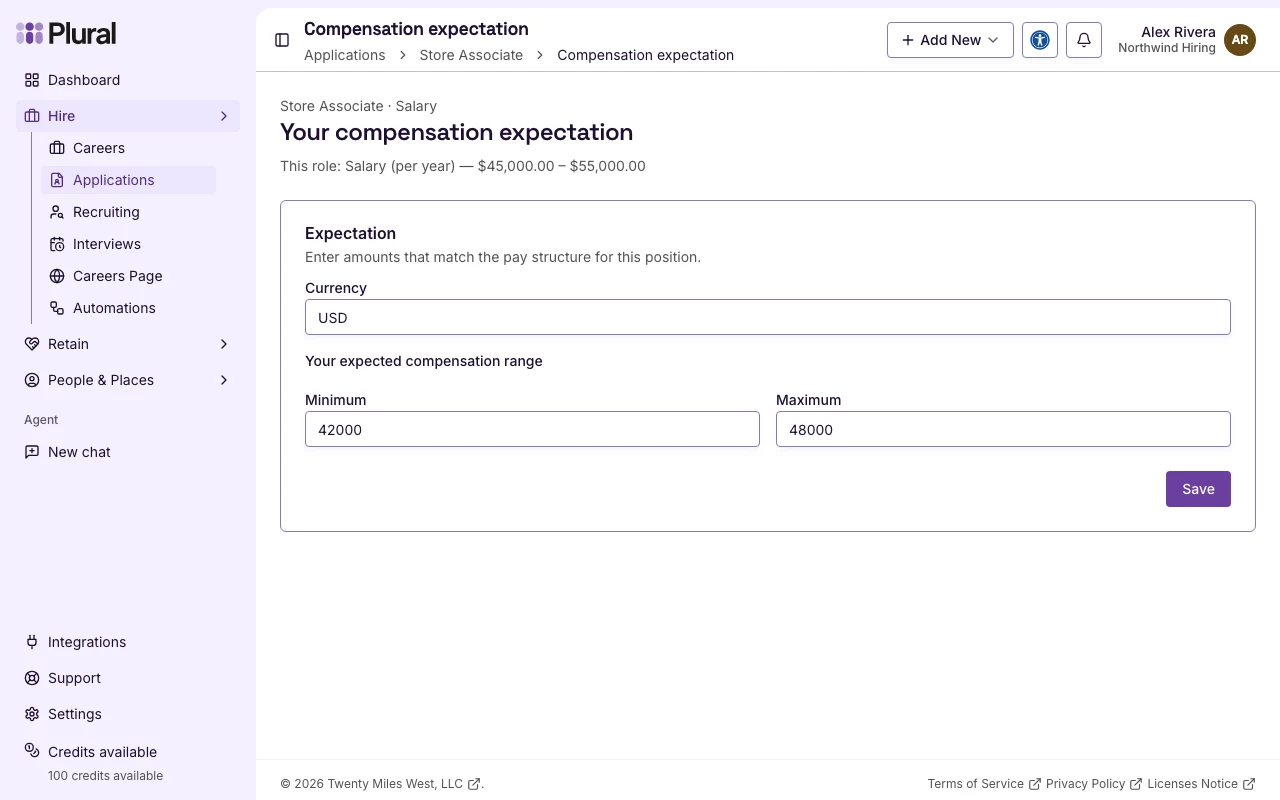
Expectation
The card title is Expectation.
- In Currency, type the currency code. Example: USD.
- Enter the range that matches the Career pay structure.
- For a salary, the label is Your expected compensation range.
- For hourly pay, the label is Your expected hourly range.
- For contract pay, the label is Your expected project compensation.
- In Minimum, type the low amount.
- In Maximum, type the high amount.
- Select Save.
This example uses Store Associate with a yearly salary. Jordan Hale expects USD 42,000 to 48,000.