
Buying credits
Read the credit balance and buy a credit package.
Credits power AI agents, recruiting search, and profile reveals. A purchase is a one-time package for the organization.
Before you start
- You must be signed in.
- These plans include this feature: Hire, Retain, Hire + Retain, and Enterprise.
- These roles can buy credits: Owner and Administrator.
- If you can see Credits but you cannot purchase, the page shows Ask an organization admin with billing access to purchase credits for your team.
- If a partner manages the organization, the page shows Settings managed by partner. You cannot buy credits on this page.
View Credits
- Open Settings, then open Billing & Usage.
- Select Credits.
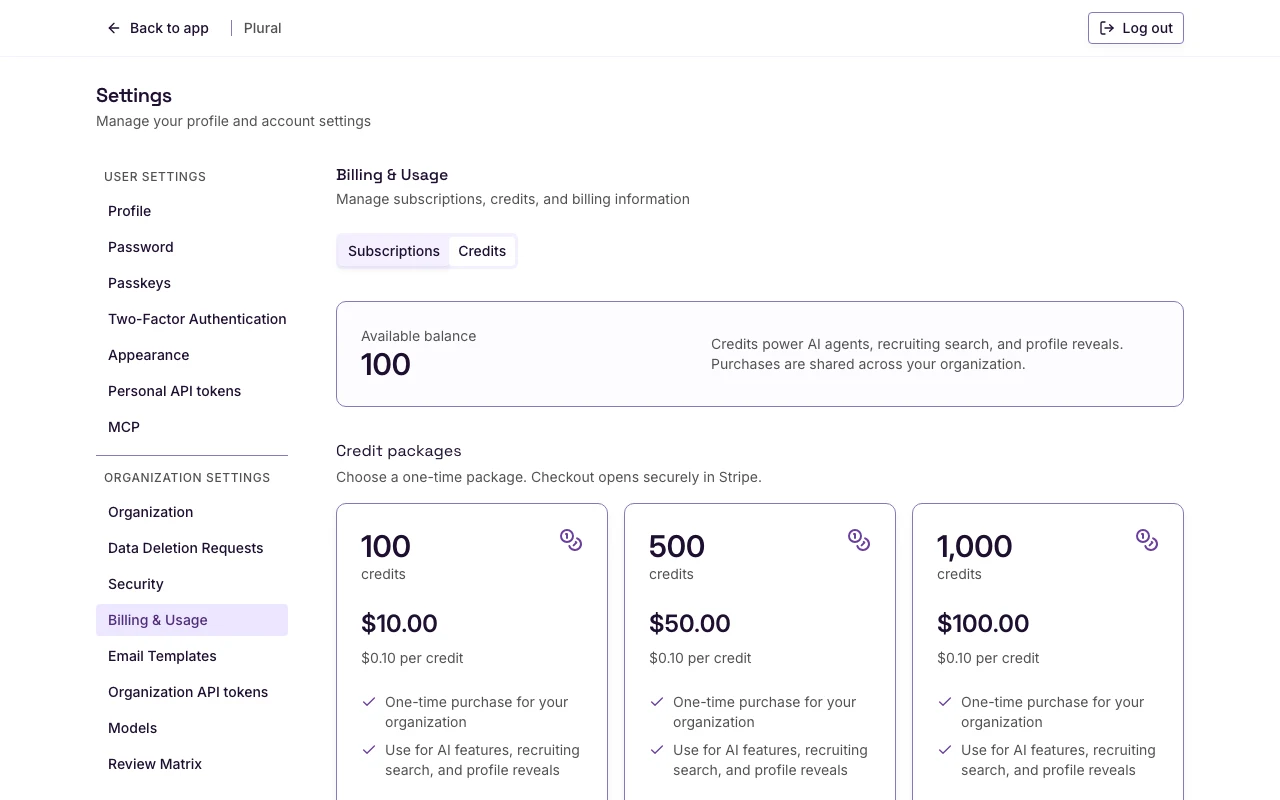
You can also select Credits available in the sidebar. Plural opens the Credits tab, or it opens a Buy credits dialog.
Credit balance
- Read Available balance. The number is the organization credit balance.
The text next to the balance is Credits power AI agents, recruiting search, and profile reveals. Purchases are shared across your organization.
If the credit data is missing, the page shows Credit balance is not available for this organization.
Credit package
The heading is Credit packages. The help text is Choose a one-time package. Checkout opens securely in Stripe.
Each card shows:
- The number of credits
- The word credits
- The package price
- A per-credit price
- One-time purchase for your organization
- Use for AI features, recruiting search, and profile reveals
Do not copy a price from this article. Use the price on the card.
- Read the credit count and the price on the card you want.
- Select Buy credits.
The button shows Redirecting…. Stripe checkout opens.
If checkout is not available on that card, the button shows Checkout unavailable.
If no packages are configured, the page shows No credit packages are configured yet. Contact support if you need to add credits.
If checkout is not enabled for any package, the page shows Credit checkout is not enabled yet. Packages will be available for purchase once billing is configured.
Recruiting credits
If you have no credits during a search, Recruiting can show Add credits to keep searching.
- Select Buy credits if you can purchase. The Buy credits dialog opens.
- The dialog text is Credits power AI features and recruiting search across your organization.
- Select a package.
- Select Continue to checkout.
If you cannot purchase, select View billing. The page can also show Ask an organization admin with billing access to purchase credits for your team.
After checkout
The checkout page title is Checkout. The heading is Adding your credits. The page then returns you to the Credits tab.
Read Available balance to confirm the new balance.